2012年11月9日 星期五

[Cluster] Storage Cluster - Using Gluster


    Cluster(
叢集)的應用主要有四種,叢集儲存(Storage Cluster)HA(High Available高可用)Load BalanceHigh Performance等,每一種都可以適用於不同的需求。

       
這篇文章筆者想測試並介紹關於Storage Cluster的應用。目前這個Gluster很熱門的使用再雲端架構的底層,而雲端這個爭議的名詞不在筆者此文章的討論範圍,講了雲端的應用會有不同的派別支持者提出不同的堅持,這並非筆者想要得到的結果。所以底下筆者就一般企業可以用來做最基本的應用而撰寫,這也是筆者在業界所見,提出很基礎卻能大幅提昇企業效能的應用。

2012年10月21日 星期日

[Cloud] OwnCloud, a self-owned DropBox-Like Server(Chinese Version)


        相信大多的IT人都有使用DropBox的服務,這個服務讓我們可以將重要的文件,同步到一個網路硬碟,然後不管道哪裡都可以用這個服務將重要的資料在異機、異地取回這些文件。然而這個服務是一個由服務提供者(Service Provide)所維護的系統,若與企業研發相關的重要機密,基於商業機密的考量,可能就無法享用這個服務的便利性了。

        筆者近來找了一些類似DropBox服務的軟體,種類相當多,而且性能都非常好,依據用途的不同可選用不同的套件。

 FTPBox,透過FTPBox套件安裝在Client端就可以將資料同步到FTP Server。看起來當前僅支援Windows平台。

ownCloud,筆者這次測試的軟體,和DropBox非常非常類似,支援多種作業系統:如Mac OS, Linux, Windows, Android...也可以使用WebDAV的方式進行同步。由於測試的結果發現這套軟體的運作非常近似DropBox,且安裝過程較無痛苦,所以是此次最佳的學習範例。另外若企業有具備維護Linux系統的人才,可採用此套軟體簡化備份、並節省大量的建置成本。自第4版開始之後,新加入版本控制功能、檔案加密、還有免安裝Client以拖拉方式進行同步等許許多多的先進能力。。

SparkleShare,鼎鼎有名的同步軟體,主要是以git套件所兜製而成,具有版本控制的功能,很適合專案開發使用。SparkleShare支援了Linux, Mac OS與Windows Vista之後的作業系統。這套系統應是功能最完整且強大的一套,筆者會在ownCloud測試完畢後繼續進行SparkleShare的安裝。


2012年10月7日 星期日

[Backup] Bacula on Ubuntu 12.04 - Chinese Version

        Bacula是一套企業級的備份軟體,且Open Source。

        這套軟體的設定過程非常複雜,所以在學習過程中有一些困難,但是實際操作後應可漸漸習慣。它的參考文件相當豐富,且備份功能十分完備。

        若小型企業在導入備份系統時,覺得市面上的備份方案太貴了,可以採用這套系統,如此軟體的採購就全部省下來了。

2012年10月5日 星期五

[Linux] NIC Card Reorder on RedHat/ CentOS

      In some cases, we may clone a system for deploy a new system quickly, then encountered a problem on NIC order.

      Let's resolve this problem.


Edit this file:     
/etc/udev/rules.d/70-persistent-net.rules


The content of this file is shown below:
# PCI device 0x14e4:0x164c (bnx2) (custom name provided by external tool)
SUBSYSTEM=="net", ACTION=="add", DRIVERS=="?", ATTR{address}=="00:11:22:33:44:55", ATTR{type}=="1", KERNEL=="eth", NAME="eth0"

# PCI device 0x8086:0x10d6 (igb) (custom name provided by external tool)
SUBSYSTEM=="net", ACTION=="add", DRIVERS=="?", ATTR{address}=="aa:bb:cc:dd:ee:ff", ATTR{type}=="1", KERNEL=="eth", NAME="eth1"
 
Just set the device name as the output "ifconfig -a" accordingly.

2012年10月1日 星期一

[CMS] WordPress Installation Guide on Ubuntu 12.04

No more description, Just do it.

First of all, REMEMBER TO INSTALL MYSQL-SERVER unless you have mysql-server(local or remote will do) already.

1. a00ylc00@WP-ubuntu1204:~$ sudo  apt-get install  mysql-server

2. a00ylc00@WP-ubuntu1204:~$ sudo  apt-get install wordpress
3. a00ylc00@WP-ubuntu1204:~$ sudo ln -s /usr/share/wordpress /var/www/wordpress
  

a00ylc00@WP-ubuntu1204:~$ cd /usr/share/doc/wordpress [You could ignore this step. The content of README.Debian tell us what to do.] JUMP to point 5.
    a00ylc00@WP-ubuntu1204:/usr/share/doc/wordpress$ ls
    changelog.Debian.gz  copyright  examples  NEWS.Debian.gz  README.Debian
    a00ylc00@WP-ubuntu1204:/usr/share/doc/wordpress$ less README.Debian
   
#### Quick setup

Setup apache to point to /usr/share/wordpress. See the examples/apache.conf

Database setup can be done with the help of a script in examples/setup-mysql
################

Good point! Let's setup the Database by examples/setup-mysql

Before that, here is a bug that would interrupt the configuration if you did not create a "debian.cnf" file before creating database.


4. a00ylc00@WP-ubuntu1204:/usr/share/doc/wordpress/examples$ sudo touch /etc/mysql/debian.cnf


5. a00ylc00@WP-ubuntu1204:/$ sudo bash /usr/share/doc/wordpress/examples/setup-mysql -n wordpress [your wordpress IP address]


PING localhost (127.0.0.1) 56(84) bytes of data.
64 bytes from localhost (127.0.0.1): icmp_req=1 ttl=64 time=0.027 ms

--- localhost ping statistics ---
1 packets transmitted, 1 received, 0% packet loss, time 0ms
rtt min/avg/max/mdev = 0.027/0.027/0.027/0.000 ms
/etc/wordpress/config-localhost.php written
Trying to create upload directory: /var/www/wp-uploads/localhost
Setting up permissions
Goto http://localhost to setup Wordpress
a00ylc00@WP-ubuntu1204:~$/etc/init.d/apache2 restart


Browse http://localhost/wordpress on your browser.


Web Installation.


Installation success.
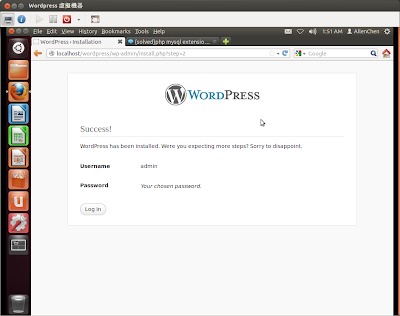


Login as admin.


Dashboard of your Wordpress site.


Try on remotely.


Wordpress installtion completed.

2012年9月9日 星期日

[時事] 嚴總裁的演講 -- 關於就業不積極的現象


最近嚴總裁在報章雜誌上可說是罵聲沖天。

罵他最多的是學生,罵的話題最多是圍繞在幾個點上:
1. 嚴長壽叫我們去當志工,說不領薪水也沒關係。
2. 嚴長壽代表的是資方,所以員工不領薪水正好合他這個演講的本意。
3. 嚴長壽鼓勵低薪。


2012年8月23日 星期四

[Backup] Some Backup system for Linux(Open Source)

         I collected some backup systems which were recommended by linux players.


1. Amanda

    a. The most famous backup system, and also a primitive backup system in Unix like OS.
    b. Amanda backup/archive computers on a network to disk, tape or cloud storage.
    c. Multi-platform supported.

    On Ubuntu, we could install amanda via "apt-get install".
    Amanda also has a enterprise version, named "Zmanda".
    The book "Unix Backup & Recovery" took some introduction on Amanda.

    There are some reason that Amanda be recommend for main backup system:
    - Using native tools to perform the backup job. Such as tar, dump..., etc. Bug would fix as the OS upgrade and developers have no need to write code for it.

Unix Backup & Recovery


Reference:
http://blog.learnadmin.com/2010/07/install-and-configure-amanda-backup.html

Why Amanda
http://blogs.umass.edu/choogend/2007/09/27/ten-things-i-like-about-amanda/

Amanda Intallation Guide(RedHat/CentOS)
http://balajitheone.blogspot.tw/2010/08/amanda-backup-installation-guide.html

2. Bacula


    A network Client/Server based backup program. I have to install and try, so we could compare with Amanda.


Reference:
Bacula - install, backup & restore


Bacula vs Other Backup Solutions
http://wiki.bacula.org/doku.php?id=comparisons

3. Areca

    Areca has a complete tutorial and sample on the main page, so user could easily to learn how to configure this backup system.

4. Flyback

    An easy, quick backup system. GUI.

5. BackupPC

    An Enterprise grade backup system. It could backup Linux, MS Windows and MAC.

Reference:
http://www.piir.ch/slackware-linux/backuppc.html

6. TimeVault

    Graphic Mode installation. But seems not maintain now.
Reference:
http://techthrob.com/2009/03/02/backing-up-in-ubuntu-made-easy-with-timevault-an-in-depth-review/


7. Others

English version Reference:

10 outstanding Linux backup utilities
http://www.techrepublic.com/blog/10things/10-outstanding-linux-backup-utilities/895

5 Free Linux Backup Solutions
http://www.foogazi.com/2008/02/25/free-linux-backup-solutions/

Top 10 Linux Backup and Recovery Software
http://tech.gaeatimes.com/index.php/archive/top-10-linux-backup-and-recovery-software/

21 of the Best Free Linux Backup Software
http://www.linuxlinks.com/article/20090105114152803/Backup.html


Chinese version Reference:

ITHOME
http://ithelp.ithome.com.tw/question/10040539?tag=rt.rq

浅用Amanda备份软件
http://asearcher.info/index.php/2012/07/27/%E6%B5%85%E7%94%A8amanda%E5%A4%87%E4%BB%BD%E8%BD%AF%E4%BB%B6/ 

 RedHat 官方文件(RHEL4)
http://web.mit.edu/rhel-doc/4/RH-DOCS/rhel-isa-zh_tw-4/s1-disaster-addres.html

10 outstanding Linux backup utilities
http://www.techrepublic.com/blog/10things/10-outstanding-linux-backup-utilities/895